📌 개요

Lombok 기능중 객체 생성 기능인 @Builder 와 기본 생성자 기능인 @NoArgsConstructor 를 함께쓰면 에러를 자주 만나볼 수 있었습니다. (직접 생성자를 정의할 때에도)
가장 간단한 해결 방법으로는 전체 매개변수를 갖는 @AllArgsConstructor 를 함께 사용하면 해결된다 이지만, 본질적으로 왜 해당 에러가 발생하는지, 해당 해결 방법은 옳은 방법인지 궁금하여, 해당 포스팅을 하게 되었습니다.
도대체 왜 빌더 어노테이션은 (모든 매개변수를 갖지 않는) 또 다른 생성자들과 마주하면 하면 컴파일 에러가 발생할까요?
🔍 @Builder 의 동작 원리
사실 이는 빌더 어노테이션의 동작 원리를 파악해보면 알 수 있었습니다.
@Builder 의 동작 원리는 아래와 같습니다.
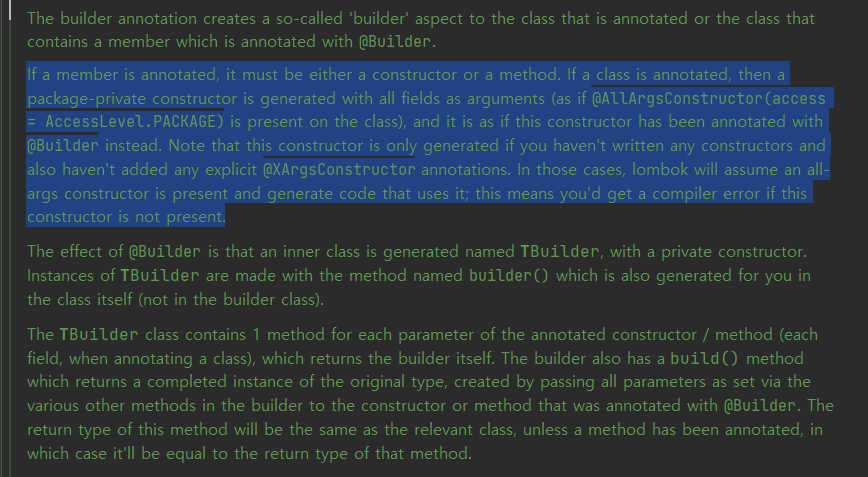
The builder annotation creates a so-called 'builder' aspect to the class that is annotated or the class that contains a member which is annotated with @Builder.
If a member is annotated, it must be either a constructor or a method. If a class is annotated, then a package-private constructor is generated with all fields as arguments (as if @AllArgsConstructor(access = AccessLevel.PACKAGE) is present on the class), and it is as if this constructor has been annotated with @Builder instead. Note that this constructor is only generated if you haven't written any constructors and also haven't added any explicit @XArgsConstructor annotations. In those cases, lombok will assume an all-args constructor is present and generate code that uses it; this means you'd get a compiler error if this constructor is not present.
The effect of @Builder is that an inner class is generated named TBuilder, with a private constructor. Instances of TBuilder are made with the method named builder() which is also generated for you in the class itself (not in the builder class).
The TBuilder class contains 1 method for each parameter of the annotated constructor / method (each field, when annotating a class), which returns the builder itself. The builder also has a build() method which returns a completed instance of the original type, created by passing all parameters as set via the various other methods in the builder to the constructor or method that was annotated with @Builder. The return type of this method will be the same as the relevant class, unless a method has been annotated, in which case it'll be equal to the return type of that method.
Complete documentation is found at the project lombok features page for @Builder .
해석해보자면, 아래와 같이 정리 할 수 있을 것 같습니다.
✅ @Builder는 클래스, 혹은 생성자 위에 명시 해야 합니다.
✅ @Builder를 클래스 위에 사용하면, 모든 필드를 인수로 사용하는 전용 생성자가 생성됩니다.
-> 📌 (@AllArgsConstructor(access = AccessLevel.PACKAGE)클래스에 가 있는 것처럼 )
-> 📌이러한 경우는 @Builder 는 생성자를 작성하지 않았고, 명시적인 @XArgsConstructor주석도 추가하지 않은 경우에만 생성됩니다.
✅ 즉, Lombok 의 @Builder 는 모든 매개변수의 생성자가 있다고 가정하고 이를 사용하는 코드를 생성합니다. 만일 모든 매개변수를 가지는 생성자가 없다면, 컴파일 에러가 발생합니다.
한마디로, @Builder는 모든 매개변수를 받는 생성자가 있다라는 것을 전제로 생성을 한다는 것!
만일, 빌더 어노테이션은 어떠한 생성자가 없다면, 모든 매개변수를 받는 생성자를 자동으로 생성해서 그에 맞게 적용을 하지만, 명시적인 생성자가 하나라도 있다면, 이러한 생성자가 생성되지 않는다는 것을 알 수 있었네요!
🔍 검증
1. 어떠한 생성자도 없을 때 :
✅ @Builder 가 전체 매개변수를 갖는 생성자 자동 생성
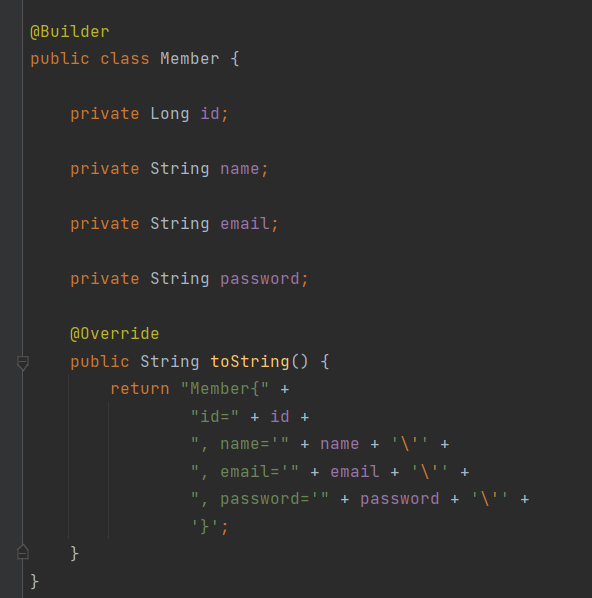
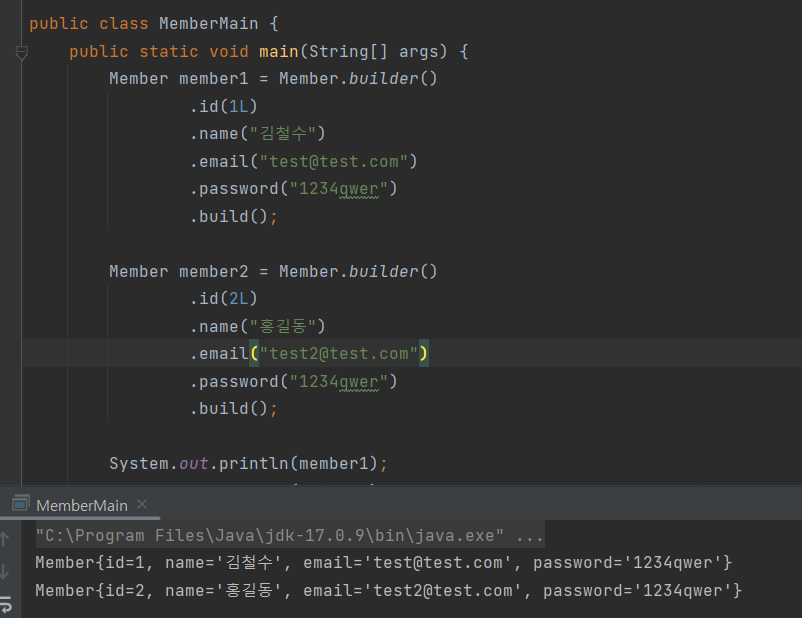
2. 명시적인 생성자가 있을 때 :
✅ 전체 매개변수를 받는 생성자가 없어서 컴파일 에러 발생
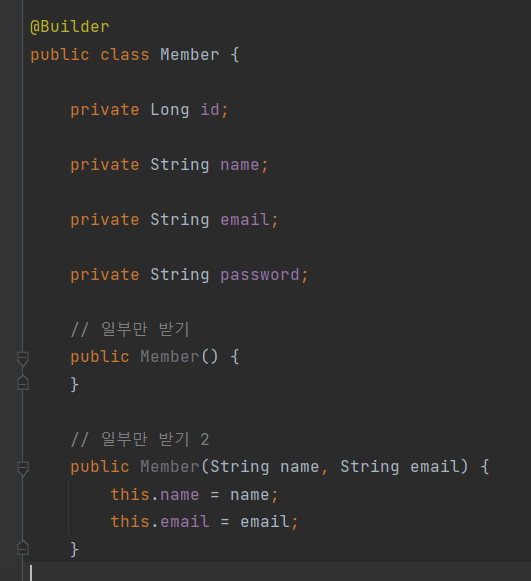
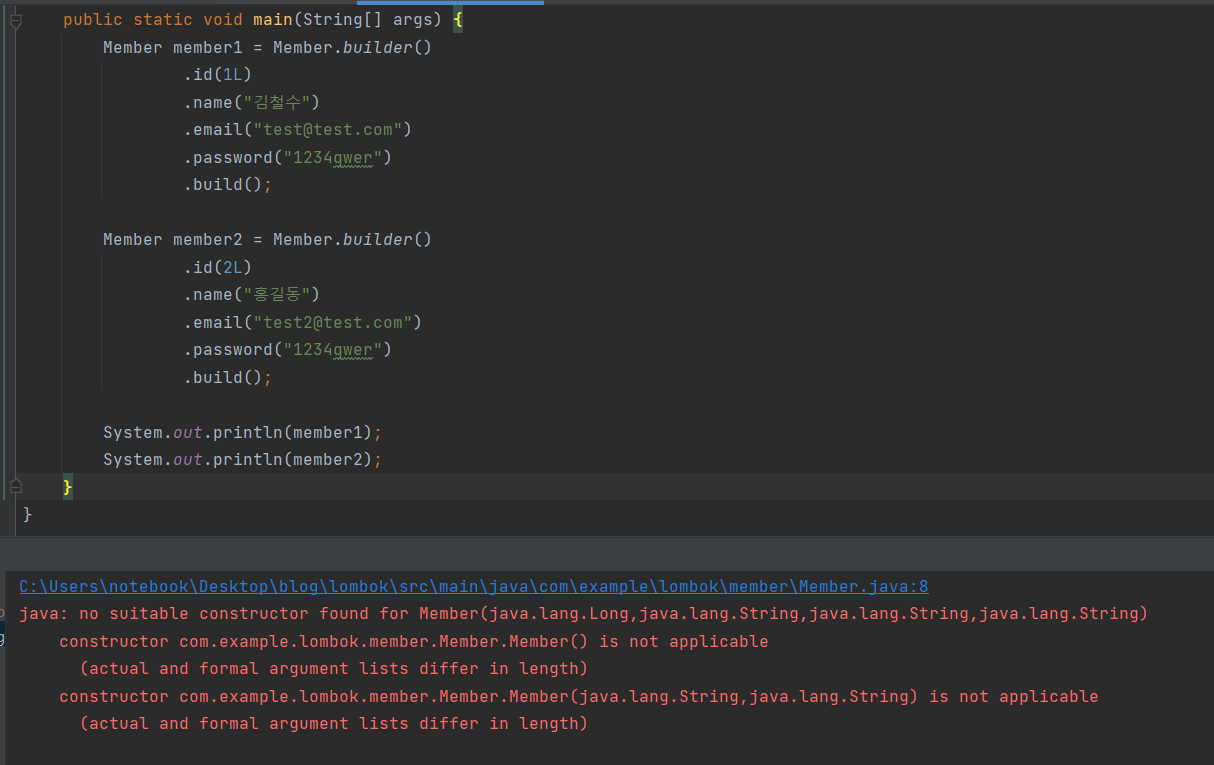
java: constructor Member in class cohttp://m.example.lombok.member.Member cannot be applied to given types;
required: java.lang.String,java.lang.String
found: java.lang.Long,java.lang.String,java.lang.String,java.lang.String
reason: actual and formal argument lists differ in length
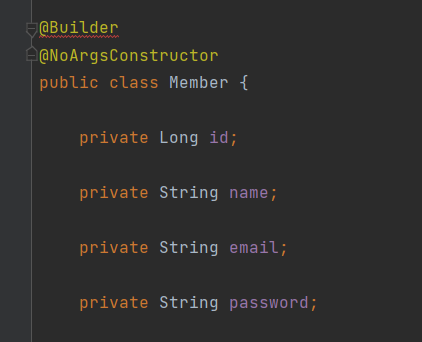
3. @ NoArgsConstructor만 썼을 때 :
✅ 전체 매개변수를 받는 생성자가 없어서 컴파일 에러 발생
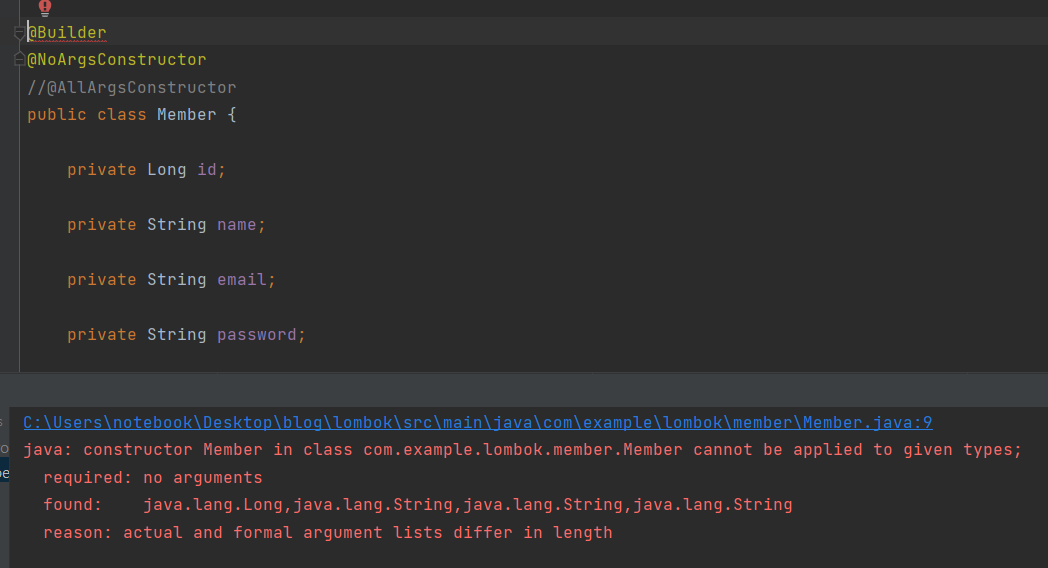
java: constructor Member in class cohttp://m.example.lombok.member.Member cannot be applied to given types;
required: no arguments
found: java.lang.Long,java.lang.String,java.lang.String,java.lang.String
reason: actual and formal argument lists differ in length
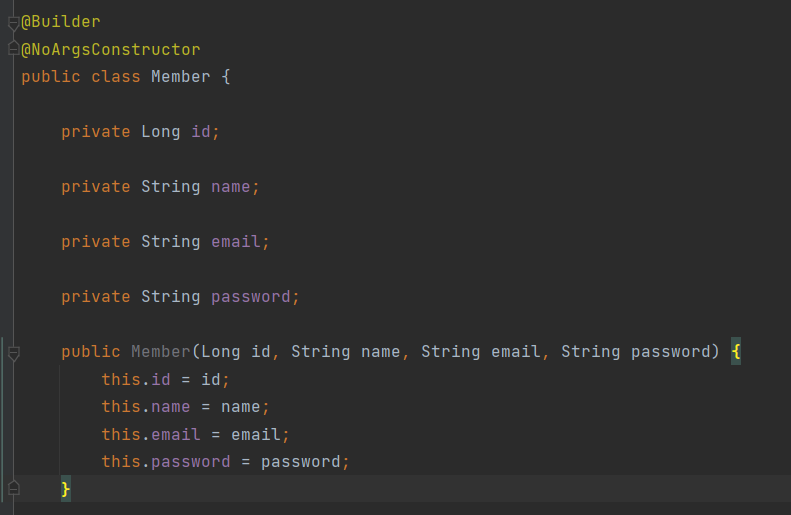
4. @ NoArgsConstructor를 쓰고, 전체 매개변수를 받는 생성자를 명시 했을 때 :
✅ 전체 매개변수를 받는 생성자가 있어서 해결
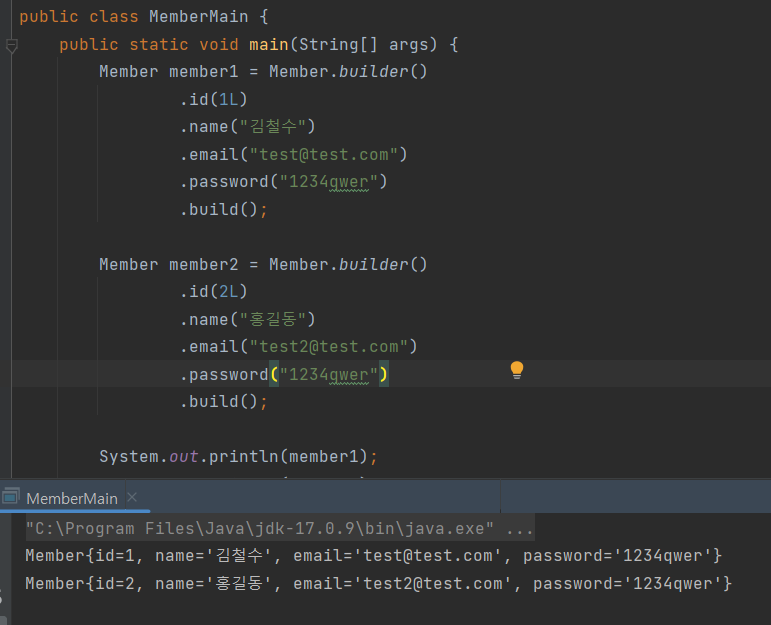
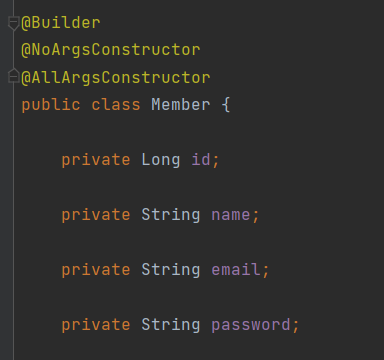
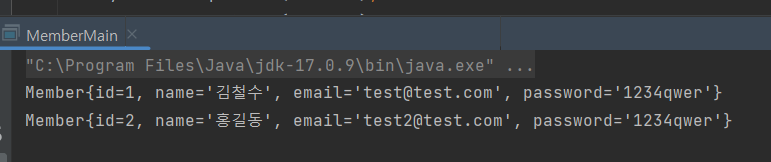
5. @ NoArgsConstructor를 쓰고, @AllArgsConstructor를 명시 했을 때 :
✅ 전체 매개변수를 받는 생성자가 있어서 해결
🔍 더 나아가서
사실, 클래스 레벨에서 @Builder 와 @AllArgsConstructor를 함께 쓰는 것은 권장되는 방법은 아닙니다!
@AllArgsContructor는 필드 순서에 따른 위험성이 다분하여 지양되는 롬복의 어노테이션 입니다.
하지만 JPA를 쓰다보면 불가피하게, Class 레벨에서 @NoArgsContructor 를 쓰게 될 일이 많기 때문에 적절한 해결방법을 모색해야 하는데요.
이 때, @AllArgsConstructor로 문제를 해결하기보다는, 생성자에 @Builder를 사용하여 해결하는 방법이 더욱 권장 될 것입니다! :-)
'[Spring]' 카테고리의 다른 글
| 다양한 Lock 기법을 활용한 동시성 제어 방법 ( Synchronized , Database , Redis ) (1) | 2024.12.30 |
|---|---|
| Spring Boot JPA : @Entity를 사용할 때 @NoArgsConstructor를 하지 않으면 에러가 나는 이유 (6) | 2024.10.20 |
| Bean을 등록하는 2가지 방법 (@Component / @Bean + @Configuration) (0) | 2024.08.04 |
| Spring Security로 로그인 구현해보기 (0) | 2024.07.25 |
| ORM, JPA, Hibernate 그리고 Spring Data JPA (1) | 2024.06.24 |